


From prompt to campaign: how AI generates a PMax import for Google Ads Editor in 15 minutes
The Problem: A standard PMax launch for an e-commerce client used to look like this for me: two hours in spreadsheets, another hour in Google Ads Editor, and half an hour fixing import errors. Three hours of pure work for every new campaign, and for a client with a growing catalog, that added up to dozens of hours per year.
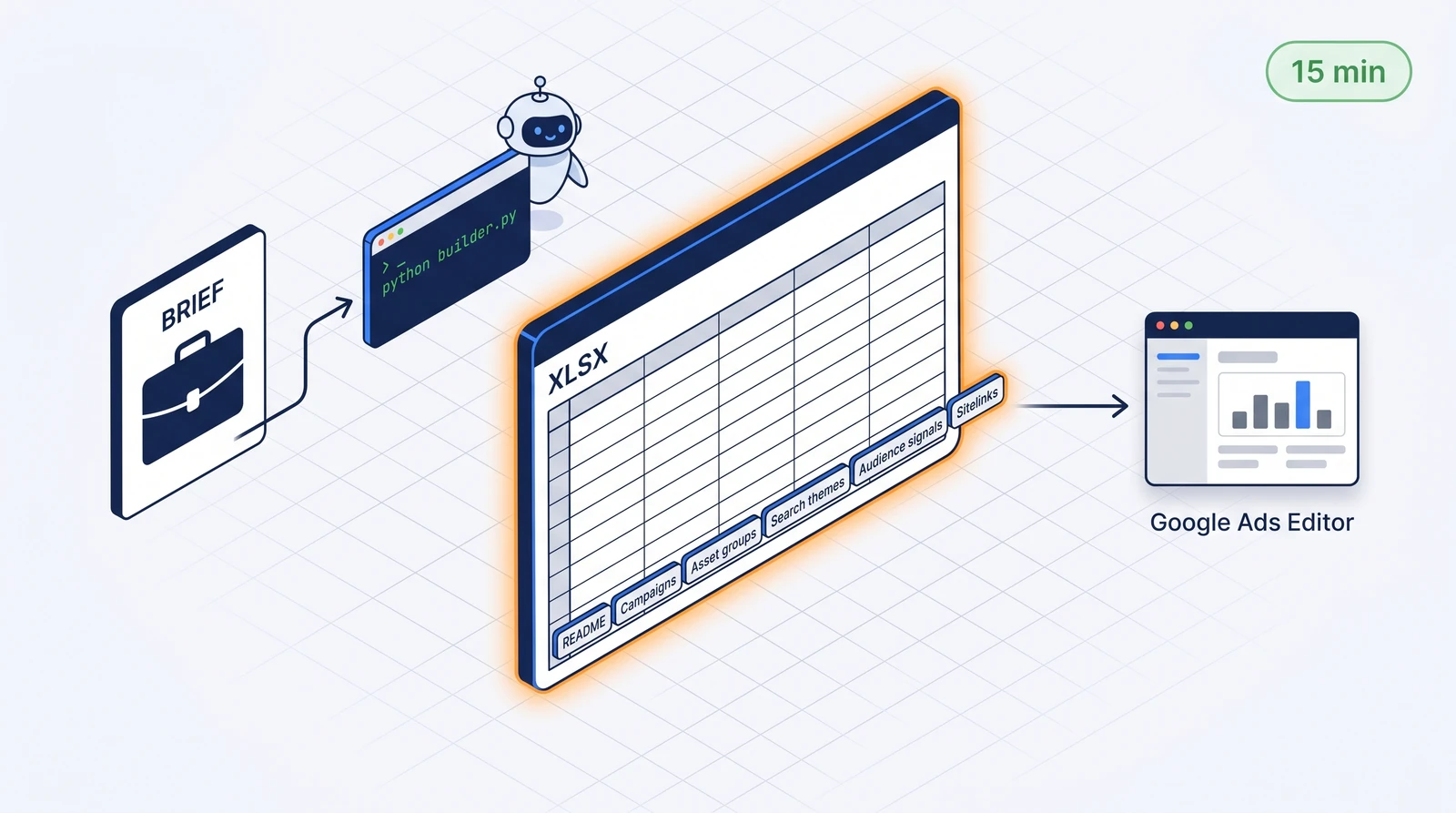
Today, I have the PMax Editor import XLSX ready in 15 minutes. From the brief to a file ready for File → Import. Three years of experience with PMax tell me what belongs in a campaign, but the assembly of the atomic pieces is handled by a script with AI assistance — and that’s a difference worth writing about.
1. Why bother with XLSX imports when the UI is available?
Google Ads UI built PMax as “fill in a few boxes and we’ll work our magic”. It works for a small campaign. At a larger scale (more asset groups, dozens of headlines, a long list of search themes, precise audience signals), the UI is slow, click-heavy, and prone to typos.
Google Ads Editor with XLSX import is the opposite — minimum UI, maximum structure. Whatever comes from a spreadsheet is fast, consistent, and controllable:
- The entire campaign + asset groups + search themes + audience signals + sitelinks in a single file
- Diff before upload — you’ll see exactly what gets written before you commit it
- Versioning in Git or Drive, tracking who changed what and when
- Bulk editing across campaigns — changing the brand voice in 8 accounts in 5 minutes
- The client can comment directly in the Sheet before it’s uploaded
The only downside: you have to know the format. Editor XLSX has rigid rules for columns, sheets, and order. You’ll struggle through error messages for the first three imports. My solution was to build a generator for it that handles the rules itself.
2. Anatomy of a PMax Editor import
Editor doesn’t take 1 sheet = 1 campaign. It takes a standardized workbook with 6 sheets, each representing one entity or its relationship:
| Sheet | Content | Format |
|---|---|---|
| README | Client, intent, instructions for a colleague | free text |
| Campaigns | Campaign settings (budget, bid strategy, URL expansion, final URL suffix) | 1 row = 1 campaign |
| Asset groups | Headlines, descriptions, long headlines, paths to images and videos | 1 row = 1 asset group (wide format) |
| Search themes | Search themes for each asset group | 1 row = 1 search theme |
| Audience signals | Custom audience / interest / remarketing signals | 1 row = 1 signal |
| Sitelinks | Sitelink texts and URL (ad-level) | 1 row = 1 sitelink |
Why separate sheets and not everything wide in one? Because Editor internally stores search themes, audience signals, and sitelinks as separate entities, not as asset group columns. When you mash them into one wide sheet, the importer either ignores them or breaks. I learned this the hard way through the “imported it 47 times and then it finally worked” method.
3. My end-to-end workflow
I’ll show it on a hypothetical setup — a retailer with three product categories, three asset groups, each with its own search themes and a broader audience signal.
1. Brief (5 min)
From the client (or from an existing audit), I have:
- Website URL and top-selling categories
- Budget and target CPA/ROAS
- Negative keywords (competitors, brands that shouldn’t be targeted — but watch out, brands you actually sell aren’t waste)
- Audience: existing remarketing lists, lookalike inspiration
2. Campaign plan in conversation with AI (5 min)
I’ll type into the AI assistant:
“Build a PMax for client X. Budget Y, ROAS target Z. Three asset groups based on categories A, B, C. I need 15 headlines, 5 long headlines, 5 descriptions, 10 search themes per AG. Headlines should be a mix of benefits + USP + price point. Audience signal: existing remarketing + interest in fitness equipment.”
AI returns a structure proposal — headline copy varied by category, search themes estimated from SERP context (and potentially from MarketingMiner MCP pull), audience signal with IDs of existing remarketing lists. I review it, tweak anything that doesn’t fit the brand voice, and delete weak variants.
3. Images (3 min)
If the client doesn’t have product shots ready, I generate them via NanoBanana from a brief (“clean studio shot of a treadmill, white background, 1200×1200 px, commercial photography”). For PMax, I need 1:1 and 1.91:1 minimum + logo square + landscape. Optimized WebP under ~350 KB per image.
4. Running the generator (2 min)
I have a pmax_xlsx_builder.py script — a reusable generator that takes a Python config (CONFIG dict) and generates a complete XLSX with all 6 sheets. Image paths are absolute. Asset groups in wide format (1 row = 1 AG, 20 columns for Image 1..20). Search themes, audience signals, sitelinks in separate sheets.
I fill out the config — typically ~60 lines of Python — and run:
python tools/pmax_xlsx_builder.py clients/retailer/pmax_config.py out/pmax_retailer_2026-04.xlsxI’ve got the finished XLSX on my drive within 20 seconds.
5. Sanity check (2 min)
I open it in Excel and scan the sheets:
- Is the budget reasonable? Campaigns
- Do the asset group and image counts look right? Asset groups
- Are the search themes per AG unique with no duplicates? Search themes
- Does the audience signal have the correct user list IDs? Audience signals
If I’m using URL templates, the Final URL suffix is correct for GA4 tracking.
6. Import into Editor (1 min)
Google Ads Editor → Account → Import → From file… → XLSX. Editor shows the diff (what’s being written). Check it, then Keep or Reject row by row.
7. Upload to Google Ads (1 min)
Post changes → the campaign is created in the account. Done.
Total 15–20 minutes.
4. Why a builder instead of manual assembly
Three main reasons why I invested time into a generator instead of manually building the template:
1. Consistency across clients. Every campaign has the same format, the same columns, and the same conventions. When I come back after a month, I get my bearings instantly.
2. Errors are fixed once, not 30 times. When I found out that Editor needs Final URL suffix as a separate column (not part of the URL), I fixed the builder. All future exports have it right.
3. Scalability without a refactor. Last fall, Google added Brand exclusions as a new field. I added a Brand exclusions column to the Campaigns sheet in the builder, filled it in for the relevant clients, and the import handled it.
I’ve open-sourced the builder internally (planning a public release) — the structure is simple:
tools/
  pmax_xlsx_builder.py      # generátor
  template_pmax_config.py   # šablona configu (copy & fill)
The config looks something like this:
CONFIG = {
    "campaign": {
        "name": "PMax_retailer_2026-Q2",
        "budget_daily": 1500,   # CZK
        "bid_strategy": "MaxConversions",
        "target_roas": None,
        "final_url_suffix": "utm_source=google&utm_medium=cpc",
    },
    "asset_groups": [
        {
            "name": "Behaci_pasy",
            "final_url": "https://retailer.cz/behaci-pasy",
            "headlines": ["Běžecké pásy od 12 990 Kč", "..."],
            "long_headlines": ["...", "..."],
            "descriptions": ["...", "..."],
            "images": ["images/treadmill_1.jpg", "..."],
            "search_themes": ["běžecký pás domů", "..."],
            "audience_signals": ["user_list:12345", "interest:fitness"],
        },
        # další asset groups
    ],
    "sitelinks": [
        {"text": "Rychlé dodání", "url": "https://retailer.cz/doprava"},
        # další
    ],
}
Everything that changes the campaign is in the config. The Builder knows exactly how to turn that into the right XLSX file.
5. What I’m actually solving here
Over the last quarter, I’ve built 11 PMax campaigns across 6 clients using this workflow. Average time from brief to upload: 17 minutes. I used to struggle to launch this even once a week; today, it’s an ad-hoc operation I can knock out between my morning coffees.
The second side effect: the quality of the initial campaign version is higher. Why? Because the generator forces me to fill out a structured config, and if I’m missing a field, I know it. When doing it manually, I’d sometimes forget long headlines or just throw in some default descriptions. The system doesn’t “forget.”
The third effect I noticed later: better client reviews. Instead of “could you check the draft in Editor to see if it looks good to you?” I send the client a config (or sheet) and they can comment directly: “swap this USP for that one,” “the pilates category is missing here.” Change the config, rerun, and you’re done.
6. What it can’t do (the limits)
To be fair—the builder handles assets and structure. It doesn’t handle the strategy for you:
- Choosing the right categories for asset groups (segmentation by margin, seasonality, volume)—that’s still my job as a PPC specialist.
- Deciding whether to even turn on PMax. For small budgets or specific B2B traffic, targeted Search is still better.
- Account-level exclusions (brand exclusions, placement exclusions)—you handle those outside of the XLSX.
- Post-launch optimization. The builder is a launch tool, not a management tool.
For post-launch optimization, I use a different workflow via Google Ads MCP (asset groups performance, search themes expansion, audience signal iterations).
Conclusion
The PMax XLSX builder is a trivial piece of infrastructure. Less than 400 lines of Python, no rocket science. But it saves me 2.5 hours with every new PMax campaign and maintains quality across my portfolio. This combination — small investment × recurring benefit — is exactly what I believe makes the difference between a freelancer who is performance-driven and a freelancer who is constantly putting out fires.
If you launch PMax campaigns manually in Editor and struggle with the same patterns (typos, forgotten fields, inconsistency across clients), consider building something like this. If you don’t want to deal with it (or don’t want to do it alone), reach out — I’d be happy to adapt the builder to your situation and hand it over in a ready-to-use state.
Are you building PMax manually and is it a pain?
I’ll show you my builder on your own campaigns and we’ll get it up and running for your setup. Half a day’s work, significantly faster launches for good.
Tech FAQ
- Why XLSX and not CSV? Editor accepts both formats, but XLSX supports multi-sheet structures and formatting (styles, validation rules). With CSV, you’d have to import it 6 times in a row.
- Why Python and not Google Sheets + macros? Scriptability, versioning in Git, better debugging, and no dependency on Google APIs. The Sheets version worked for six months, but Python is more robust.
- Does the builder support Shopping (retail PMax)? Yes, just fill in
feed_labelandmerchant_center_idin the config. The product part of the campaign then runs via the Merchant Center feed, while the rest (asset groups, search themes) behaves just like a standard PMax. - How do I handle image optimization? Before importing, I run all images through a mini script — 1200×1200 crop, WebP 85 quality, ~300 KB target. Asset performance in Google Ads shows that lightweight images render more consistently.
- Are you planning to open-source the builder? Yes. Once the documentation and tests reach the level I’d expect for something I share.